Comparing Python Trading Bot Development Across MT5, cTrader, and TradingView

To cut straight to the chase: I recommend MetaTrader 5 (MT5).
If you want to build a versatile Python trading bot — one that works seamlessly across various brokers and trading environments — MT5 is by far your best choice.
When setting out to build a trading bot, you have several platforms to choose from. In this article, I will compare the three most prominent contenders: MT5, cTrader, and TradingView.
Naturally, you could use broker-specific proprietary Python APIs. However, in the world of Forex and CFD trading, you will inevitably need to switch brokers at some point.
For instance, you might transition from a standard retail Forex/CFD broker to a prop firm, or you might hit tax considerations that require moving from an individual to a corporate account — only to find your current broker uncooperative. If your trading bot relies entirely on a broker’s proprietary API, this vendor lock-in makes migrating your strategy a nightmare. Therefore, to build a future-proof trading bot, selecting one of the three established third-party platforms is strongly advised.
Now, let’s break down MT5, cTrader, and TradingView.

1. Why MT5 Is the Pragmatic Choice
The biggest advantage of MT5 is that Python development is straightforward. It offers a robust, well-maintained Python API. More importantly, it boasts the largest active community among the three. Over 80% of retail Forex and CFD traders rely on the MetaTrader ecosystem. Anyone with programming experience — regardless of the language — knows just how invaluable active community support is when you hit an unexpected bug.
However, keep this critical constraint in mind: To run a Python trading bot with MT5, you must run it on Windows.
MetaTrader exists in two main versions: MT4 and MT5. While MT4 is still widely used, it is legacy software that MetaQuotes is actively phasing out. Crucially, MT4 does not support a Python API.
MT5, its modern successor, natively supports Python. While MT5 client terminals are distributed for Windows, macOS, and Linux, you should stick to the Windows environment for Python development. MetaQuotes officially supports the native Python API only on Windows.
Many developers and traders use macOS or Linux machines. For those environments, setting up a cloud instance like AWS is the standard approach, which I will cover in detail later in this series.
While MetaQuotes offers its own built-in MQL5 VPS hosting (since running a 24/7 non-stop machine at home isn’t ideal), the native MQL5 Cloud VPS does not support Python. Furthermore, if you plan to incorporate machine learning or AI models down the road, relying on a home desktop creates operational risks. Setting up a dedicated cloud server (like AWS EC2 or a Windows VPS) is practically essential. I will address cloud deployment architectures in a future guide.
2. cTrader: Technically Modern, but a Steep Uphill Battle for Python
Can you build a Python trading bot on cTrader? Yes. cTrader officially provides an Open API.
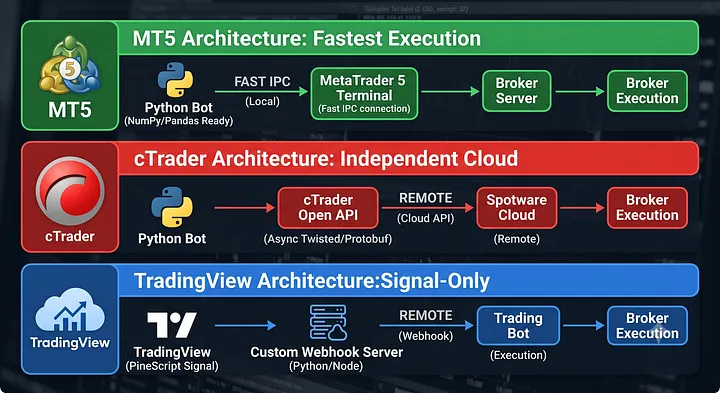
However, the programming curve compared to MT5 is dramatically steeper. With the MT5 Python library, market data is returned cleanly as structured NumPy arrays that seamlessly convert into Pandas DataFrames with a single line of code.
In contrast, cTrader’s official Python SDK relies on the Twisted framework and Google Protocol Buffers (Protobuf) — an architecture rarely favored by modern Python quant developers. The asynchronous boilerplate and message encoding/decoding overhead can easily overwhelm developers. Transforming raw packets into Pandas DataFrames requires substantial low-level plumbing. While community-maintained wrappers exist on GitHub, many are poorly maintained as the broader cTrader Python ecosystem has stagnated.
Another major hurdle is broker availability. As your trading journey progresses, you will likely operate across multiple brokers or explore prop firms. Many automated bots are specifically built to target prop firm evaluations. Here, cTrader falls behind: the roster of brokers supporting cTrader is notably smaller than MT5, and its footprint among top-tier prop firms remains quite limited.
To be fair, cTrader’s API has distinct architectural merits: Unlike MT5 — which strictly requires the desktop application (terminal64.exe) to be running in the background to interface via IPC — cTrader’s Open API does not require the client desktop app to be active. It communicates directly over web sockets with Spotware’s cloud servers. This means you can run a pure, lightweight headless bot on a Linux server without ever installing a desktop GUI. From a pure fintech architecture perspective, it is remarkably clean.
Still, if you are building your first production bot or require broad broker and prop firm compatibility, cTrader is difficult to recommend for Python users.
Personal Note: While it sounds like I am heavily criticizing cTrader, it remains the undisputed champion outside the MetaTrader duopoly, holding roughly 10% of the retail CFD market. Its native UI/UX is miles ahead of MT4/MT5. In fact, for discretionary manual trading, I personally use cTrader and find it hard to trade on anything else. But for building automated Python trading bots, I consistently turn to MT5.
3. TradingView: Elite Charting, Inconvenient Python Workflows
TradingView dominates the charting and technical analysis industry. It provides an exceptional analytical environment and a massive repository of free community indicators. Its proprietary scripting language, Pine Script, powers countless automated strategies.
However, once you step into the Python domain, the workflow becomes cumbersome. TradingView does not offer an official native Python API. While workarounds exist — such as configuring webhook alerts to send JSON payloads to an external Python server — the architecture introduces unnecessary complexity and latency. If you must engineer custom webhook middleware just to parse and execute basic orders, the original advantages of using TradingView diminish quickly.
Why Not Just Use External Data Feeds (yFinance, FRED, etc.)?
You might wonder: “Why not source macro/market data via yfinance or FRED, evaluate signals in Python, and execute orders elsewhere?”
The primary issue here is broker dependency and data latency.
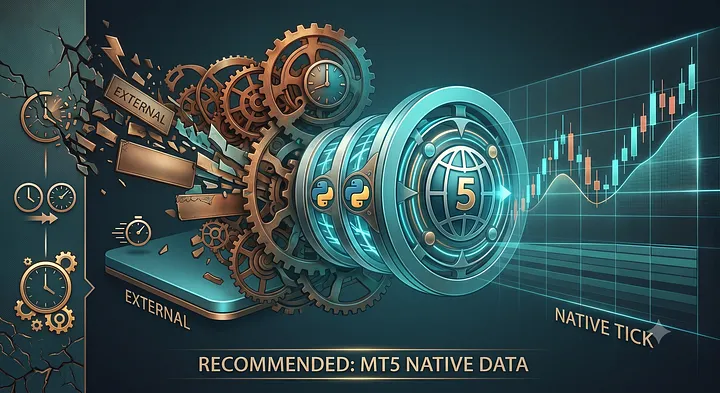
Public data aggregators typically introduce 200ms to 1,000ms (0.2–1s) of latency. In volatile CFD or index markets, that delay can be fatal. In contrast, an MT5 Python pipeline running on a co-located VPS achieves sub-millisecond (around 0.001s) latency.
While premium real-time data feeds (such as Polygon.io) solve the speed issue, they incur steep monthly subscription fees (ranging from tens to hundreds of dollars). More importantly, third-party data feeds cannot reflect your specific broker’s real-time variable bid/ask spread. Because CFD brokers constantly adjust dynamic spreads based on intraday liquidity, evaluating entry signals on SIP/NBBO exchange feeds while executing on broker spreads creates a costly execution mismatch.
For retail algorithmic traders, MT5 provides tick-level broker execution data and trade routing in a single, cost-effective pipeline.

Starting the Series
For discretionary manual execution, cTrader’s polished interface is compelling. For deep technical screening, TradingView is unmatched. But if your goal is to deploy capital using automated Python algorithms across diverse broker environments with minimal friction, MT5 remains the most stable and battle-tested infrastructure available.
Now that we have established the rationale behind choosing MT5, we can begin building.
Note: In this tutorial series, while our trading platform of choice is MT5, our reference broker will be BlackBull Markets.
I have outlined my reasons for choosing BlackBull Markets in detail in this article (Link). You are welcome to use any MT5-compatible broker or prop firm account of your choice; the core code remains fully transferable. However, keep in mind that individual broker symbol naming conventions (e.g., NAS100 vs. USTEC) and contract specifications may vary, which might require slight parameter adjustments in your script.
Now, let’s dive into building a Python trading bot in MT5 step by step.Catch you in Part 1 of the series!